
True smart lighting performance depends on intelligent circuit design behind the wall, not just the brand of bulb you screw in.
- Monolithic, single-switch circuits are a primary source of energy waste; granular control is key.
- Local-control protocols like Zigbee or Thread offer superior reliability and speed compared to cloud-dependent Wi-Fi devices.
- Smart relays and switches are the foundation, allowing you to retrofit intelligence while keeping existing fixtures and aesthetics.
Recommendation: Prioritize an infrastructure-first approach. Plan your wiring, switch locations, and communication protocol before choosing a single fixture to create a robust, efficient, and truly future-proof system.
Embarking on a smart home renovation brings the promise of seamless control and futuristic convenience. For many, this journey starts with lighting. The common advice is to simply swap old bulbs for new, Wi-Fi-connected ones. You download an app, connect to your router, and suddenly you can change colors from your couch. But as anyone who has lived with this setup knows, the reality is often a patchwork of unresponsive devices, confusing apps, and the dreaded “smart bulb, dumb switch” problem, where a single flip of a physical switch renders the entire system useless.
The frustration is real, but it doesn’t stem from faulty products. It comes from a flawed strategy. The secret to a truly intelligent, reliable, and efficient lighting system isn’t in the bulb itself; it’s in the electrical infrastructure that powers it. Instead of thinking about gadgets, we need to think about circuits, protocols, and control points. This is the difference between a collection of smart devices and a genuinely smart home. By focusing on the wiring plan first, you build a resilient foundation that works flawlessly with both physical switches and voice commands.
This guide moves beyond the superficial advice. We will explore how to design lighting circuits that not only save energy but also create sophisticated, layered ambiances. We’ll dissect the critical choice between communication protocols for whole-home reliability and demonstrate how to avoid common design mistakes. Ultimately, you’ll learn how to plan a system that integrates seamlessly, reduces energy consumption, and elevates your home’s functionality from the breaker box up.
This article provides a comprehensive roadmap for planning your smart lighting infrastructure. We will cover everything from foundational wiring principles to advanced automation strategies, ensuring your renovation results in a truly intelligent and responsive environment.
Summary: Planning Circuits for a Smart Home Renovation
- Why Old Wiring Layouts Waste 20% of Your Lighting Energy?
- How to Layer Ambient, Task, and Accent Lighting in a Windowless Room?
- Wi-Fi vs Zigbee Bulbs: Which Is More Reliable for Whole-Home Integration?
- The ‘Runway Effect’ Mistake in Hallway Recessed Lighting
- How to Retrofit Smart Switches Without Rewiring Your Entire House?
- Why You Can’t Just Add Outlets Anywhere in a Kitchen Renovation?
- The Vampire Power Drain: How Much Do Standby Appliances Cost You?
- How to Use Smart Automation to Reduce Heating Bills by 15%?
Why Old Wiring Layouts Waste 20% of Your Lighting Energy?
Traditional home wiring often relies on a “monolithic” approach: one switch controls all the lights in a room. This all-or-nothing design is a significant source of hidden energy waste. When you enter a large kitchen or living room and need only a small amount of light over a specific area, you are forced to illuminate the entire space, running multiple fixtures at 100% brightness. This lack of circuit granularity is the fundamental flaw that smart technology can solve, but only if the wiring is planned correctly. The potential for improvement is substantial; some research indicates smart lighting can cut electricity usage by up to 75%.
The inefficiency isn’t just about usage patterns. Older installations, particularly those with low-voltage halogen systems, often use bulky magnetic transformers. These components draw a continuous “standby” current even when the lights are off, contributing to a constant energy drain. Furthermore, the absence of dimming capabilities on most legacy circuits locks them into maximum power consumption. Simply dimming lights to 80% brightness—a barely perceptible change—can reduce energy use by nearly 20%, savings that are inaccessible with a simple on/off switch.
By rethinking the circuit layout during a renovation, you can break free from these limitations. Instead of one circuit for an entire room, you can create multiple, smaller circuits dedicated to specific zones or functions. This allows a smart system to activate only the necessary lights, at the precise brightness level required, fundamentally changing your energy consumption profile from wasteful to efficient.
This foundational shift from monolithic to granular wiring is the first and most critical step in building a truly efficient smart lighting system.
How to Layer Ambient, Task, and Accent Lighting in a Windowless Room?
In a room without natural light, such as a basement office or an internal bathroom, creating a comfortable and functional atmosphere is a significant design challenge. The key is to use layered lighting, a technique that combines three distinct types of illumination to mimic the complexity of daylight and eliminate the static, flat feeling of a single overhead fixture. These layers are Ambient, Task, and Accent lighting, and each requires its own consideration at the circuit planning stage to be effective.
- Ambient Lighting: This is the general, foundational light that fills the room. In a windowless space, this can be achieved with recessed ceiling lights, cove lighting with LED strips, or large-format fixtures that provide a soft, diffuse glow.
- Task Lighting: This is focused, functional light directed at specific activities. Examples include a desk lamp in an office, under-cabinet lighting in a workshop, or vanity lights around a bathroom mirror. It should be on a separate circuit for independent control.
- Accent Lighting: This is directional light used to highlight architectural features, artwork, or decorative objects. Think of a spotlight on a painting or uplighting on a textured wall. It adds depth, contrast, and visual interest to the space.
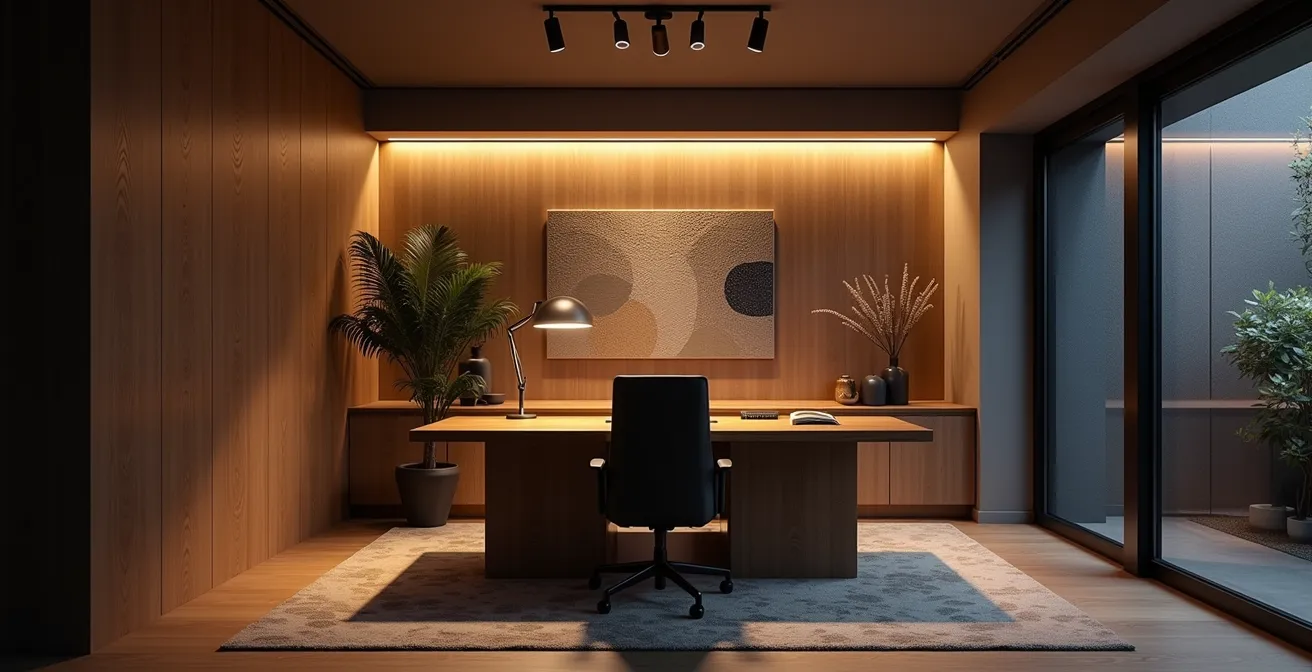
The true power of this approach is unlocked with smart control. As demonstrated in a project by Ask This Old House, combining dimmable LED strips, smart switches (with neutral wires for consistent power), and programmable scenes can create dynamic lighting that transforms a windowless space. By automating color temperature adjustments throughout the day—cooler, brighter light in the morning and warmer, dimmer light in the evening—the system can replicate natural circadian rhythms, making the room feel more connected to the outside world and vastly more comfortable.
Properly layered and automated lighting can turn a potentially oppressive windowless room into one of the most inviting spaces in the home.
Wi-Fi vs Zigbee Bulbs: Which Is More Reliable for Whole-Home Integration?
When building a smart home, the choice of communication protocol is one of the most critical decisions you’ll make, directly impacting system reliability, speed, and scalability. The market is dominated by Wi-Fi-based devices and those using mesh network protocols like Zigbee and Z-Wave, with Thread/Matter emerging as the next-generation standard. For a tech-savvy homeowner aiming for a robust, whole-home system, understanding the architectural differences is key. Wi-Fi bulbs are easy to set up but create significant long-term reliability issues.
Each Wi-Fi device connects directly to your router, acting as an independent client on your network. As you add more devices—bulbs, plugs, cameras—your router becomes congested, leading to slowed performance, dropped connections, and unresponsive commands. Most critically, these devices rely on a cloud server to function. If your internet goes down, your smart home becomes dumb. In contrast, Zigbee and Z-Wave create a dedicated mesh network for your smart devices. Each device can communicate with its neighbors, strengthening the network and extending its range. More importantly, they typically operate via a local hub, meaning commands are processed inside your home (local processing), resulting in near-instantaneous response times and continued functionality even without an internet connection.
This comparative analysis from a guide by The Ambient clearly breaks down the core differences.
| Feature | Wi-Fi Bulbs | Zigbee/Z-Wave | Thread/Matter |
|---|---|---|---|
| Internet Outage Performance | Most become ‘dumb’ without cloud | Local hub processing continues | Local processing with IP architecture |
| Network Scalability | 50+ devices degrade network | Requires mesh density | Self-healing mesh + IP benefits |
| Response Time | 0.5-2 seconds (cloud dependent) | Instant (local processing) | Instant with future-proofing |
| Power Consumption | Higher (constant Wi-Fi) | Lower (optimized protocol) | Ultra-low with modern efficiency |
For a small apartment with a few bulbs, Wi-Fi might suffice. But for a comprehensive home renovation, a system built on a dedicated mesh protocol like Zigbee or the forward-looking Thread/Matter is unequivocally the more reliable and scalable choice.
The ‘Runway Effect’ Mistake in Hallway Recessed Lighting
One of the most common and visually jarring mistakes in residential lighting design is the “runway effect.” This occurs when a series of recessed downlights are installed in a straight, symmetrical line down the center of a hallway ceiling. While seemingly logical, this approach creates a sterile, tunnel-like feeling, produces harsh shadows, and does little to make the space feel welcoming or architecturally interesting. It’s a purely functional solution that completely misses the opportunity to use light as a design tool.
A much more sophisticated approach is to use lighting to expand the perceived space and add visual texture. This can be achieved through circuit planning that supports more dynamic lighting techniques. Instead of a single, central line, consider these professional strategies:
- Asymmetrical Wall Washing: Position the fixtures closer to one wall and aim them at that surface. This technique illuminates the vertical plane, making the hallway feel significantly wider and brighter. It also provides the perfect opportunity to highlight artwork or an interesting architectural finish.
- Alternating Circuits: Wire the lights in an alternating pattern (e.g., 1, 2, 1, 2). With smart controls, this allows for staggered activation, creating soft “chase” effects or enabling a dimmed, low-level scene that only uses half the lights.
- Low-Level Pathway Lighting: Install a dedicated low-voltage circuit for LED strips along the baseboards. Connected to motion sensors, this provides soft, glare-free illumination for navigating at night without the harshness of overhead lights.

These techniques require more thoughtful circuit planning during the renovation phase but yield a dramatically superior result, proving that fixture placement and circuit strategy are just as important as the fixture itself.
How to Retrofit Smart Switches Without Rewiring Your Entire House?
The dream of a smart home often clashes with the reality of existing wiring. Many homeowners believe that achieving integrated lighting control requires tearing open walls to run new cables. However, one of the most powerful and practical solutions in a smart home integrator’s toolkit is the in-wall smart relay. These compact modules are installed directly inside the junction box behind your existing, “dumb” light switches, effectively upgrading them with smart capabilities without altering the home’s aesthetic.
Unlike a smart bulb, which requires the circuit to be constantly powered on, a smart relay works in tandem with the physical switch. The relay controls the power to the light fixture, while the switch simply sends a signal to the relay. This elegant solution solves the biggest complaint with smart bulbs: a guest or family member can still use the physical wall switch to turn lights on and off intuitively, while you retain full smart control via an app, voice assistant, or automation routines. The system never becomes “dead” because the smart component is always powered.
A well-documented case study from a homeowner in Australia highlights the success of this approach. They retrofitted their entire home using Shelly 1 and 2.5 relay modules, maintaining the original wall plates and switches. This “infrastructure-first” strategy provided a seamless bridge between traditional usability and modern automation, creating a system that was both powerful and guest-friendly. The key is ensuring you have a neutral wire in the switch box, which is common in modern construction but may require an electrician to verify in older homes.
When selecting connected gadgets for your home, bear in mind these are some of the ones you are most likely going to need to wire up… But if you can turn off the power at the breaker, you’ll find that dealing with the accessible wiring in your home is simple and straightforward
– The Ambient Smart Home Guide, Smart Home Wiring 101: A Beginner’s Guide
This method provides the best of both worlds: the tactile reliability of a physical switch and the endless possibilities of smart automation, all without the cost and disruption of a full-scale rewire.
Why You Can’t Just Add Outlets Anywhere in a Kitchen Renovation?
The kitchen is the electrical heart of the modern home. It’s no longer just a place for a refrigerator and a toaster; it’s a hub for high-power cooking appliances, smart displays, charging stations, and sophisticated lighting. During a renovation, the temptation is to add outlets wherever there’s an empty space on the wall. However, this approach is not only inefficient but also dangerous and often violates electrical codes. A proper kitchen electrical plan requires a strategic approach based on load calculation and dedicated circuits.
High-draw appliances like induction cooktops, smart ovens, and even powerful microwaves require their own dedicated 20A (or higher) circuits to operate safely without tripping a breaker. Lumping these onto the same circuit as your lighting or small appliance outlets is a recipe for disaster. Furthermore, modern electrical codes (like the NEC in the United States) have strict requirements for kitchens, including the number of small appliance branch circuits and the mandatory use of GFCI (Ground Fault Circuit Interrupter) protection for all outlets serving countertop surfaces to prevent electrical shock.
A forward-thinking plan also accounts for low-voltage infrastructure. Running CAT6 Ethernet cables to key locations enables Power over Ethernet (PoE) for devices like wall-mounted smart displays or security cameras, providing both data and power over a single cable. Similarly, planning for dedicated DC wiring can create sleek, integrated USB-C charging hubs in an island or backsplash without clumsy adapters. A smart integrator must ensure that any smart switches or outlets selected are specifically designed to be compatible with GFCI/AFCI protection to avoid nuisance tripping.
Your Action Plan: Essential Kitchen Circuit Planning Requirements
- Map appliance hot zones: Identify locations for high-power devices (smart ovens, induction cooktops) that require dedicated 20A circuits separate from lighting.
- Plan low-voltage infrastructure: Run CAT6 cables for PoE devices like wall-mounted tablets and dedicated DC wiring for USB-C charging hubs in islands.
- Ensure GFCI/AFCI compliance: Select smart switches and outlets specifically designed to work with GFCI protection without creating conflicts or nuisance tripping.
- Calculate total load: Work with an electrician to ensure your main panel can handle the new combined load of all appliances and lighting.
- Separate lighting circuits: Keep all lighting on circuits that are separate from outlets to prevent flickering when a high-power appliance kicks on.
Ultimately, a kitchen electrical plan is a technical blueprint for safety and performance. It’s a system that must be engineered, not just decorated.
Key Takeaways
- True smart lighting is built on an infrastructure of granular circuits, reliable protocols, and intelligent switches, not just Wi-Fi bulbs.
- Local-control protocols like Zigbee, Z-Wave, or Thread/Matter are essential for creating a responsive and reliable system that works even when the internet is down.
- Strategic circuit planning can eliminate energy waste from monolithic layouts, reduce vampire power drain, and enable sophisticated design techniques like layered lighting and wall washing.
The Vampire Power Drain: How Much Do Standby Appliances Cost You?
Vampire power, also known as phantom load or standby power, is the electricity consumed by devices when they are turned off but still plugged in. While the drain from a single device might seem negligible, the cumulative effect of dozens of electronics across a home can be substantial, often accounting for a significant portion of a monthly electricity bill. In a smart home, devices like AV receivers, network-attached storage (NAS), mesh Wi-Fi nodes, and smart speakers are designed to be “always on” and are prime culprits.
Quantifying this waste is the first step to eliminating it. A powerful case study from a smart home builder illustrates this perfectly. By installing a Span smart electrical panel, which allows for real-time monitoring of individual circuits, they identified that their home’s AV and networking equipment collectively consumed 150 watts continuously in standby mode. That’s the equivalent of leaving two 75-watt incandescent bulbs running 24/7. This data empowers the homeowner to take targeted action instead of guessing.
The solution isn’t to run around unplugging everything. A well-designed smart home can automate this process. In the aforementioned case, the builder programmed an automated “Goodnight” scene. This routine, triggered by a single command, used smart relays to completely cut power to the circuits feeding these non-essential zones overnight. This simple automation, as documented in the analysis of the real-time monitoring project, resulted in a 12% reduction in their total monthly electricity bill without any perceived change in lifestyle. The system powered back on automatically in the morning, ready for use.
By using circuit-level monitoring and control, you can slay the vampire power drain and achieve significant, effortless energy savings.
How to Use Smart Automation to Reduce Heating Bills by 15%?
Smart thermostats are widely recognized for their energy-saving potential, with many studies suggesting smart thermostats can save up to 20% on heating and cooling bills. However, most of these savings come from simple scheduling and remote access. The true power of a smart home lies in system-level integration, where the HVAC system doesn’t just operate on a timer but responds intelligently to what’s actually happening elsewhere in the house. Your lighting circuits hold the key to this next level of efficiency.
Modern smart lighting systems often use occupancy or motion sensors to automate lights, turning them on when someone enters a room and off when they leave. By itself, this is a great energy saver. But when you feed that same occupancy data to your smart thermostat, you create a system that can avoid heating or cooling empty rooms. Instead of maintaining a set temperature throughout the entire house, the system can create dynamic micro-climate zones, prioritizing comfort in occupied spaces while setting back the temperature in vacant ones. This is far more efficient than manual zone dampers or simply closing air vents.
This integration strategy can be extended even further for greater gains:
- Window Treatment Integration: Smart blinds can be wired alongside the lighting circuits on a windowed wall. The system can then use this to manage solar gain, automatically opening blinds on sunny winter days to capture free heat and closing them during hot summer afternoons to reduce the load on the AC.
- Humidity Monitoring: Adding humidity sensors to your automation routines allows the system to maintain an ideal relative humidity (around 40-50%). Properly humidified air feels warmer at lower temperatures, allowing you to set your thermostat a few degrees cooler in the winter while feeling just as comfortable, generating further savings.
By making your HVAC system aware of occupancy, sunlight, and humidity, you transform it from a brute-force utility into an intelligent, responsive comfort system that actively works to lower your energy bills.